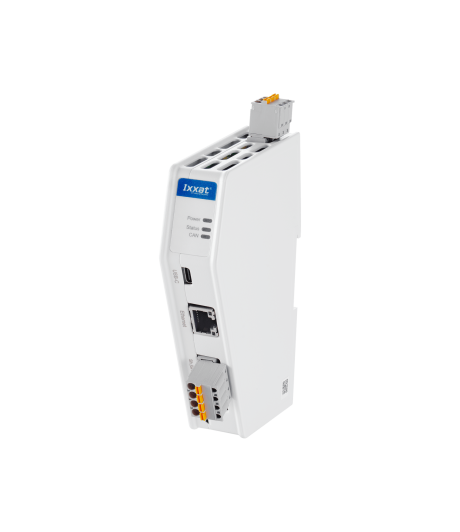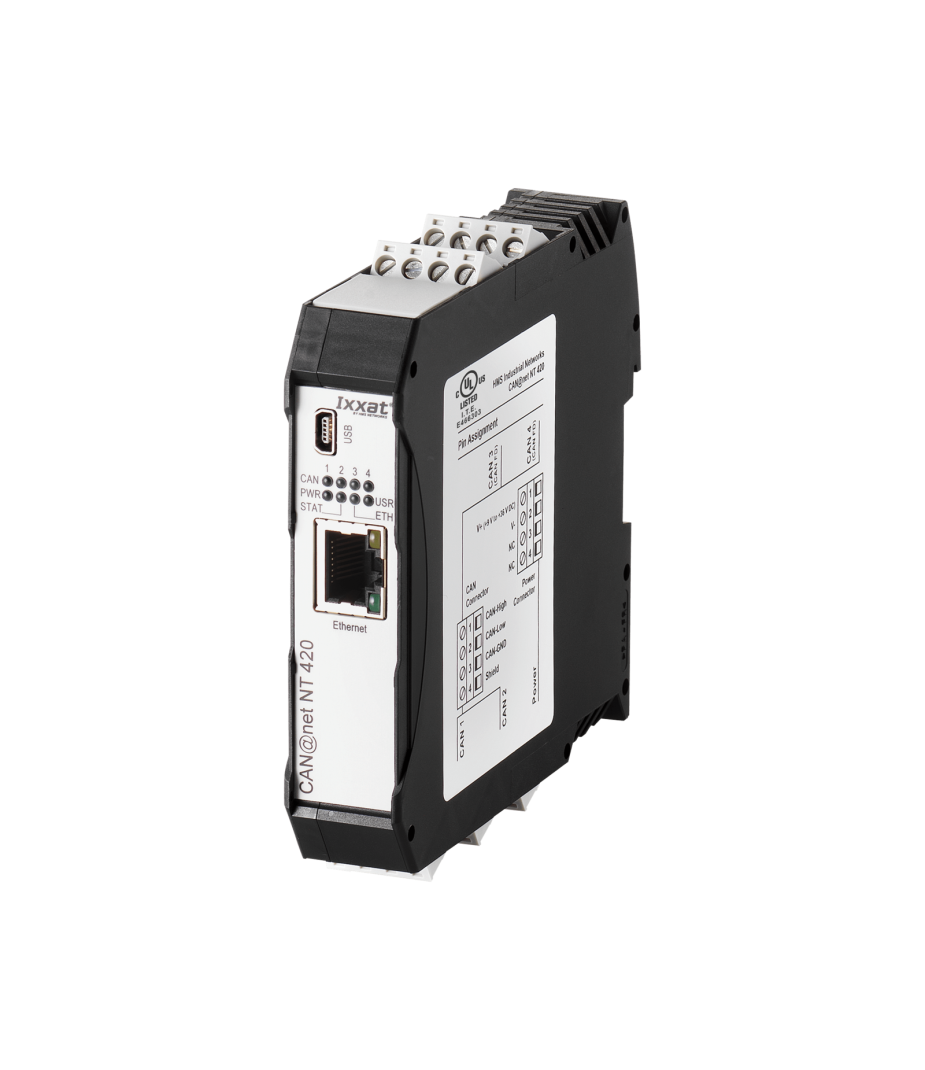


CAN@net NT 420



CAN@net NT
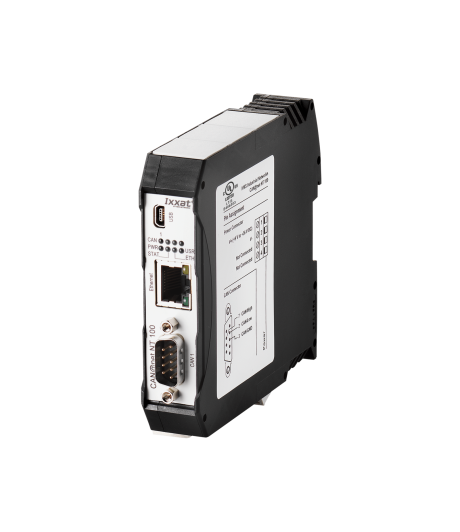
The CAN@net NT 420 offers a variety of functionalities that can be flexibly deployed in any desired application.
CAN-to-Ethernet Gateway
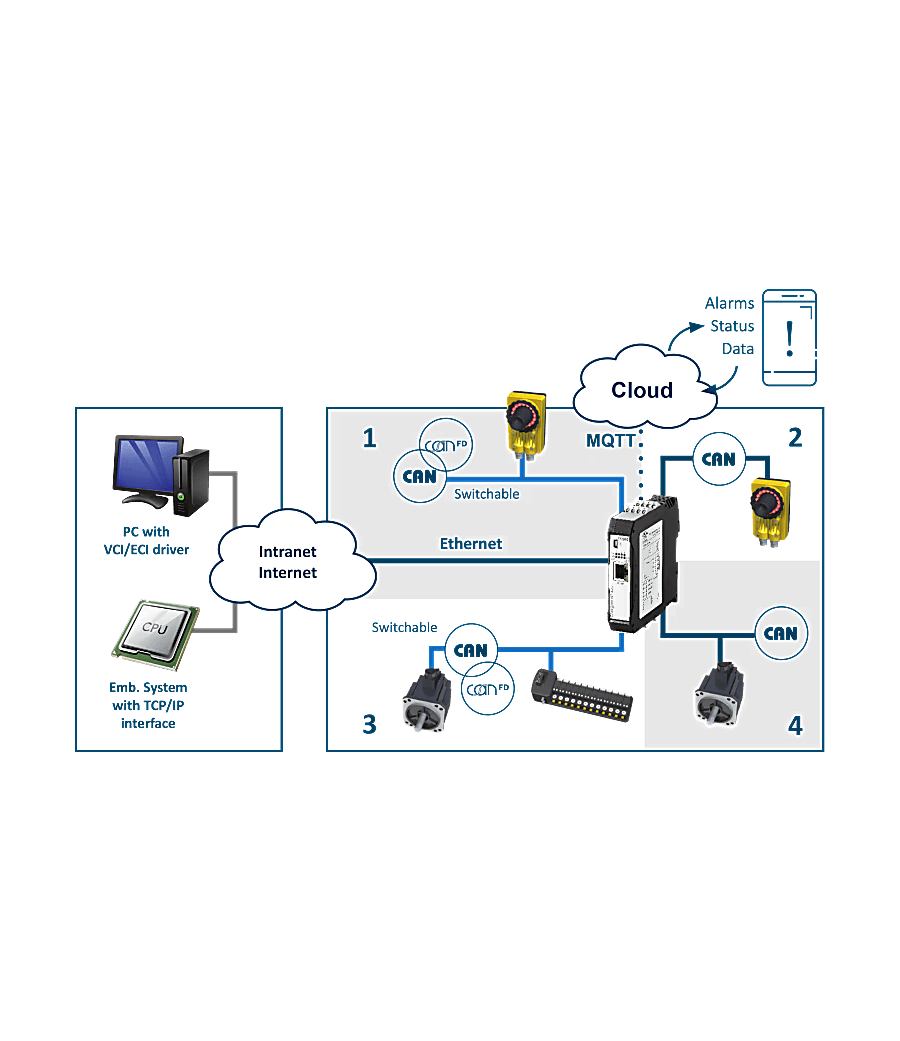
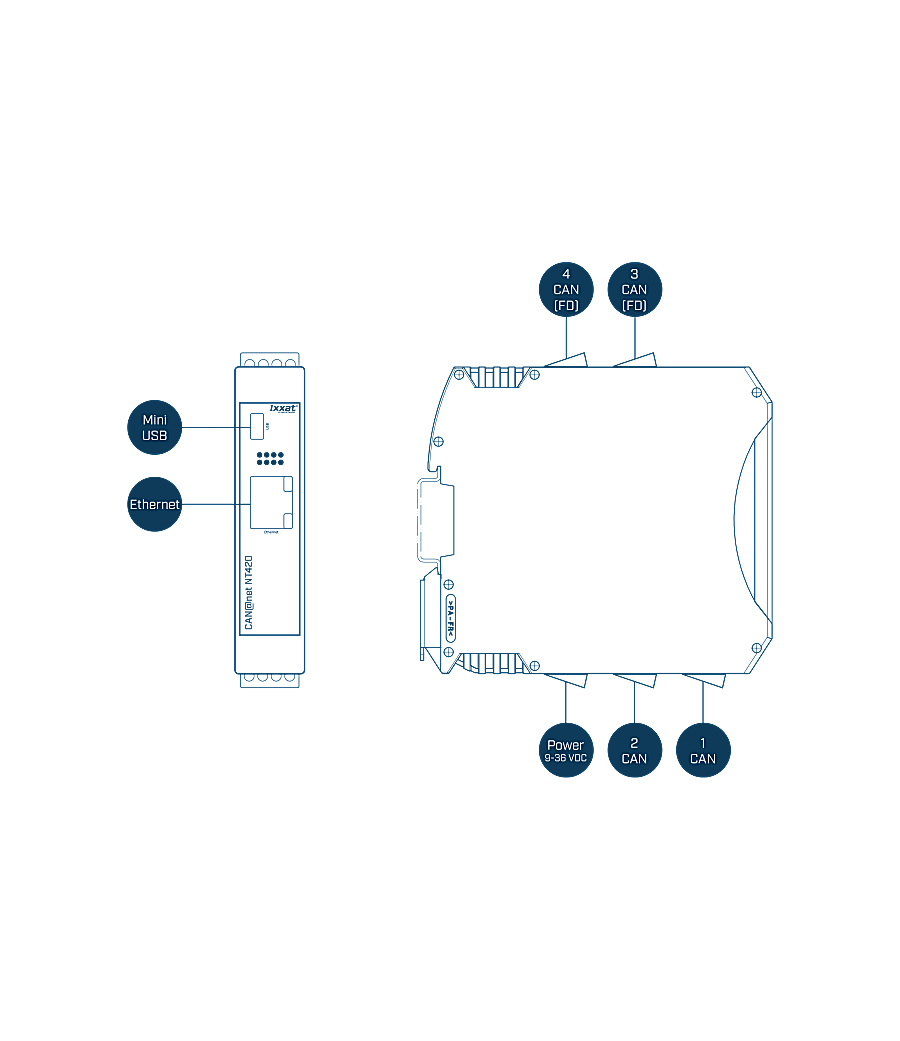
In gateway mode, the CAN@net NT 420 can be accessed directly from, for example, Windows®, Linux, VxWorks, and QNX-based systems and servers, as well as from embedded environments. Communication takes place via a standard TCP/IP socket and uses a standard ASCII protocol for this purpose. As a CAN Ethernet Gateway, the CAN@net NT 420 offers simple and flexible access to four independent CAN FD / CAN channels, via a LAN or via the internet.
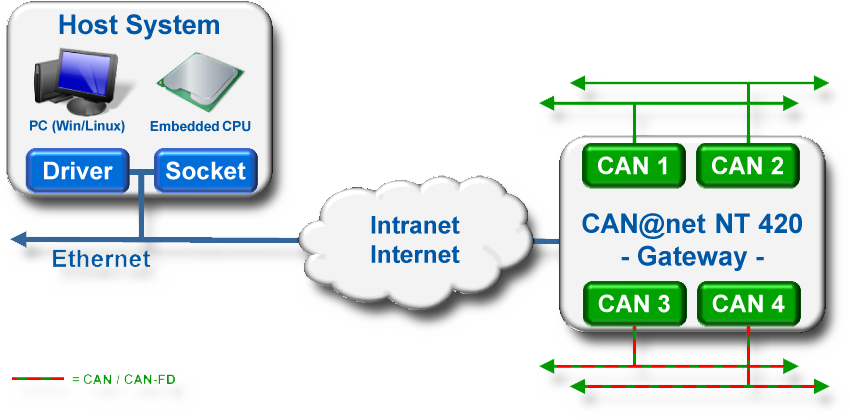
For the interfacing, the free source code C API ixcan is available, allowing applications with CAN interfacing to be built without the need for an additional (kernel) driver.
CAN-to-Ethernet PC interface
With the included VCI driver for Windows®, the CAN@net NT 420 can be used as a full-fledged PC interface, like all Ixxat CAN FD/CAN PC interfaces. With CAN@net NT, all VCI-based Ixxat instruments, such as the canAnalyser, as well as customer-specific applications based on the VCI driver, can be used. The VCI CAN FD/CAN driver offers the ability to communicate with up to 128 CAN@net NT devices simultaneously.
CAN-to-Ethernet-CAN Bridge
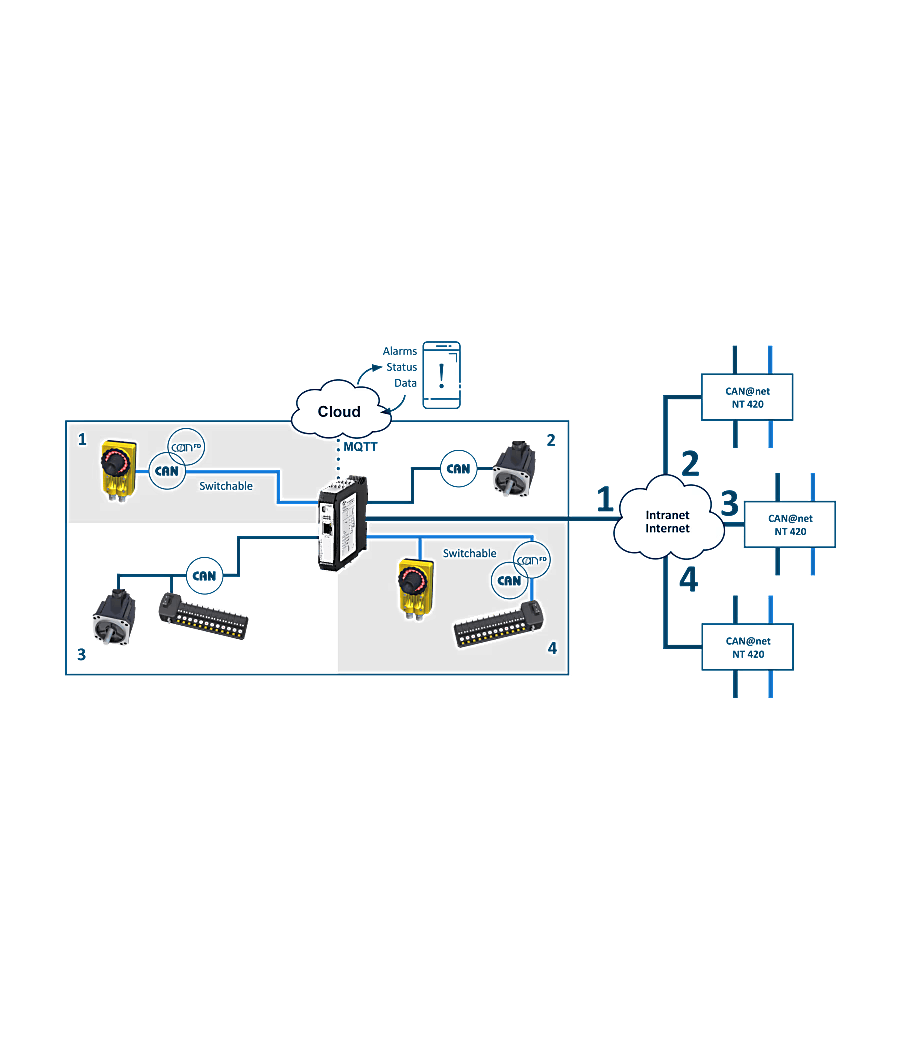
Using two CAN@net NT 420, a CAN-Ethernet-CAN bridge can be implemented that connects four independent CAN FD / CAN channels to each other. This bridge enables the exchange of CAN FD/CAN messages between CAN FD/CAN systems via TCP/IP over long distances – using an existing Ethernet-based infrastructure. The segmentation also increases the reliability and stability of the overall system.
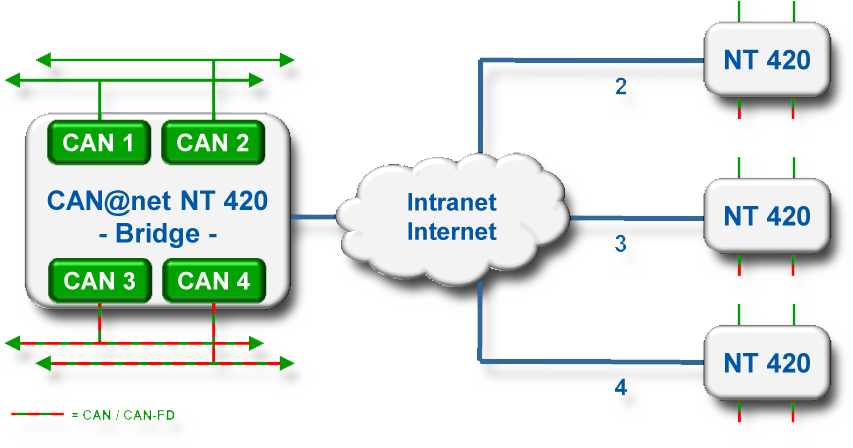
The CAN@net NT 420 offers the unique ability to connect up to 4 devices to each other via Ethernet. This allows extensive star typologies to be realized. The star functionality works only with CAN@net NT 420s, not with other CAN@net NT devices.
Filtering and Assigning
By using assignment tables, message reception/transmission is possible between all channels. Using filter and conversion rules, CAN or CAN FD messages can be filtered or modified. This mechanism allows for a reduction in bus load within the individual networks. For SAE J1939 applications, a special assignment table is provided, adapted to the specific parameters.
The CAN Gateway Configurator enables free routing configurations. Individual messages or message groups can be
assigned from and to any CAN FD/CAN port. The route through the device always starts at the receiving controller (message transmitter) and ends at the transmitting controller (message receiver).
For SAE J1939 applications, a special mapping table is provided, adapted to the specific parameters.
Multiplexing
Multiplexing is a unique feature of the CAN@net NT 420. It allows up to 8 classical CAN messages to be ‘packaged’ into a single CAN FD message. In the receiver, this data is unpacked back into classical CAN messages. This means that 8 times as many messages can be sent in the transmission time of a single classical CAN message.
Multiplexing only works from CAN to CAN, i.e. in local CAN Bridge mode.
Action Rules
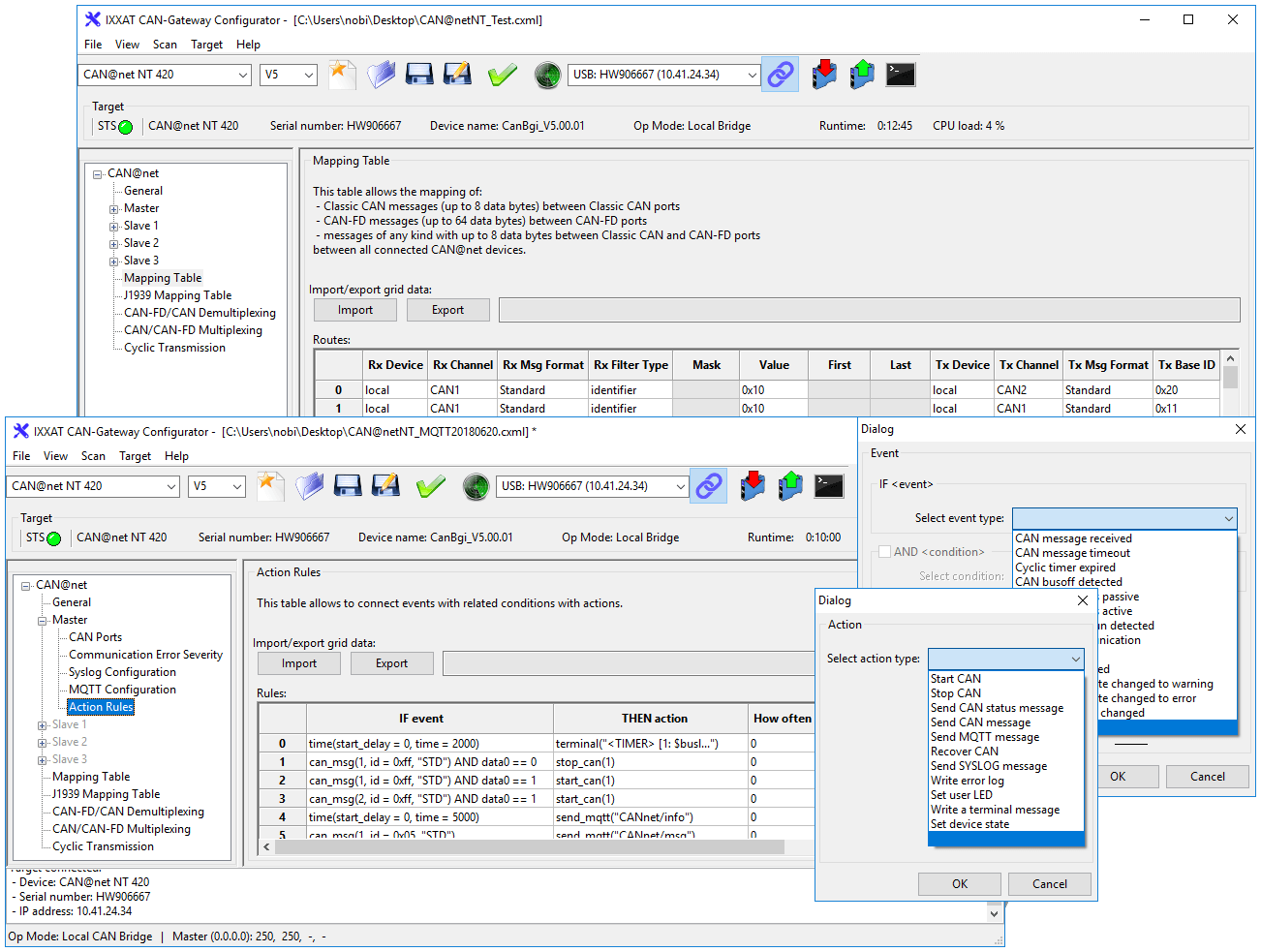
In response to received messages, device or CAN FD/CAN bus status events, a variety of actions can be performed automatically, e.g. sending messages (CAN FD/CAN, MQTT), changing device settings, or switching device LEDs. Action rules are created via intuitive event and action drop-down menus within the Windows®-based Device Configuration Tool.
Status Message
For diagnostics and troubleshooting, the CANbridge NT can send a status message via CAN if desired. For each CAN FD/CAN channel, it is reported whether it is Active, Error, Bus Off, or Not Available.
MQTT for cloud connection
Whether device status or CAN FD/CAN data, the MQTT functionality of the CAN@net NT 420 enables transmission of various information to the cloud – easily programmable using action rule lists. With free available broker services and APPs, e.g. status messages or system values can be easily transmitted to your smartphone or other devices.
Cyclic transmission
The cyclic transmission feature enables cyclic forwarding of messages. Both, messages and cycle times are defined within a central cyclic transmission table.
LUA
Additional programming of all kinds of action rules is made possible by using LUA. This is a powerful, efficient, and lightweight scripting language that is built in by default.
CAN@net NT
Configuration and firmware update
Using an easy-to-operate Windows® configuration tool, the CAN@net NT 420 can be configured and firmware updates can be performed either locally via USB or remotely via the Ethernet interface. The tool makes it very easy to configure filter, mapping or translation rules without any programming knowledge.. With the tool, the configuration of filter, mapping or translation rules can be carried out very easily, without programming skills.
With the help of mapping tables, the exchange of messages between all channels can be configured very flexibly. Filter and conversion rules can be applied to the CAN FD/CAN messages. As a result, the bus load in the individual networks can be reduced since only relevant messages are transmitted to the other network.
ASCII Ethernet messages
In Gateway Mode, the CAN@net NT 420 exchanges standardised ASCII messages via TCP. The message format used is fully documented and available for download. Using the examples provided, TCP Stream Handling can be used to exchange messages between the CAN@net NT 420 and a device with an Ethernet connection.
C-API ixcan
The Ixxat C-API ixcan is a programming interface for C applications that allows software to communicate directly with the Ixxat CAN@net NT 420 gateways. The API translates C function calls into ASCII commands according to the ASCII Gateway Mode of the CAN@net NT. This allows developers to send, receive, and process CAN messages without having to fully implement the underlying ASCII protocol themselves. C-API ixcan can be easily implemented in any application or Operating System without the need for an additional (kernel) Device Driver. The API is not compatible with the Ixxat VCI driver.
The Ixxat C-API ixcan is intended for specialized technicians familiar with ASCII, CAN, CAN FD, and programming in C.
LUA SDK
The CAN@net NT 420 comes standard with Ixxat Lua ADK (Application Development Kit). This is based on the standard Lua 5.3.5 distribution, a fully featured implementation of Lua 5.3 and optimised for CAN@net NT. Lua scripts can be used to implement additional functionality for processing or responding to CAN messages.
CAN Bus Monitor
Ixxat canAnalyser 3 Mini
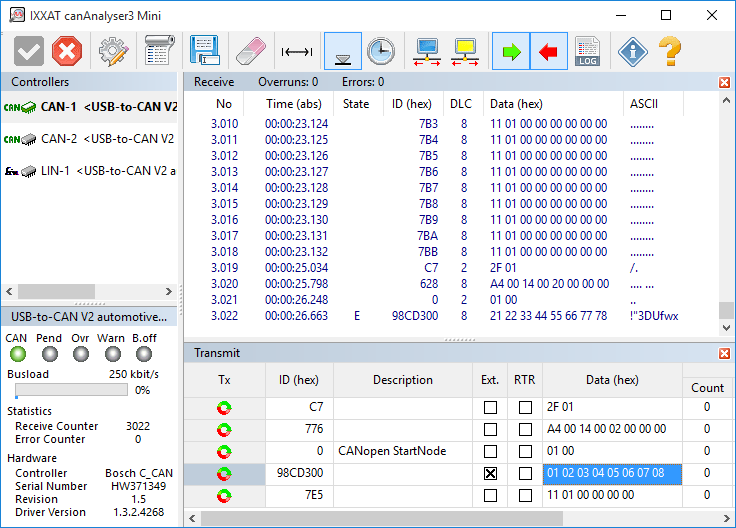
For simple testing purposes and start-up canAnalyser Mini - a free CAN bus monitor - is installed with the VCI. This monitor can be used to display CAN messages with time stamp, message identifiers and data using the CAN@net NT 420. A logging function enables the data received to be recorded directly to hard disk. CAN messages are transmitted via a list wherein CAN messages are entered. Installed interfaces are displayed with the available CAN controllers, the current bus load and the controller status.
canAnalyser Mini also support CAN-FD and LIN in combination with interfaces supporting these protocols.
Common Driver
Ixxat CAN Interface Driver
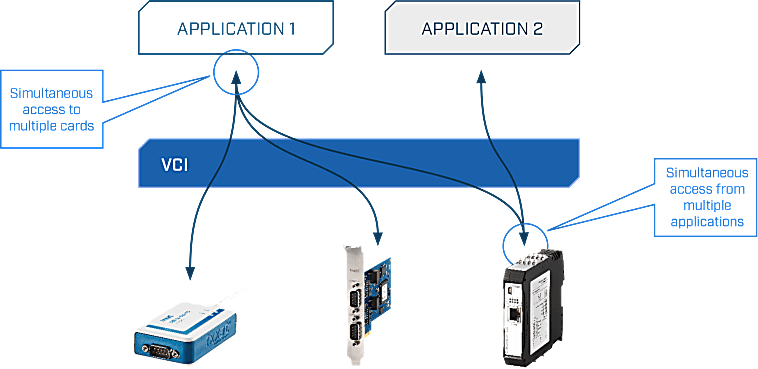
Two different drivers are available for the software interfacing of the CAN@net NT 420: the universal driver "(Virtual Communication Interface" (VCI) for Windows® and the “Embedded Communication Interface” (ECI) for Linux, INtime, RTX, VxWorks and QNX. The drivers can operate all CAN channels and all CAN interfaces - even different types - within one PC.
These powerful driver packages support all CAN boards, regardless of their PC interface, with a uniform programming interface (API). This means that applications based on VCI-API can be used with all Ixxat CAN boards without modifying the application program. The drivers support multi CAN-channels and/or multiple boards – even different types – to arrange the desired amount of channels.
Features and benefits
- Common application programming interface (API) for all supported operating systems and interfaces
- Simultaneous support of multiple CAN channels and interface boards
- Standard (11 bit, CAN 2.0A), extended protocol (29 bit, CAN 2.0B) and CAN-FD1
- Support of protocol-switching on interfaces with low-speed CAN1 or LIN1
- Slim communication interface while supporting all required mechanisms for an easy operation of the interface
- Detection and display of error frames on the bus
- Measurement and display of the bus load (only with active CAN cards)
- Possible operation in "Listen only mode" 1 For interfaces that support these protocols
Virtual Communication Interface (VCI)
- Fee driver for CAN interfaces under Windows® 2000, XP, Vista, 7, 8 and 10.
- Application interfaces available for C++, .NETI, Java, LabView, DasyLab and LabWindows
- Convenient card installation via the Device Manager
- Prepared dialog for interface/channel selection
- Automatic firmware download with active cards
Embedded Communication Interface (ECI)
- Free driver for active and passive CAN interfaces under Linux, INtime, RTX, VxWorks and QNX.
- Application interfaces available for C and a vendor-independent API called SocketCAN
- Low memory footprint
- Specially suitable for dedicated embedded applications
- Real-time capable (INtime, RTX, VxWorks and QNX)
Programming environment
Ixxat VCI API
The VCI API (Application Programming Interface) is a powerful software library that enables developers to easily communicate with industrial network interfaces, particularly within CAN- and/or LIN-based systems. This API forms an abstraction layer between applications and hardware, allowing developers to avoid working directly with device-specific drivers and instead utilize a uniform and standardized interface.
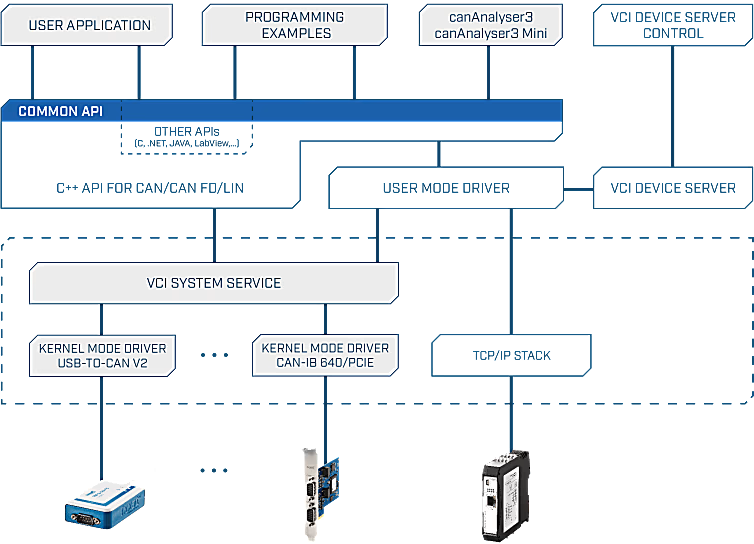
With the VCI API, applications can send and receive CAN messages in both standard and extended formats. Additionally, the API enables the detection, configuration, and management of connected Ixxat devices. Developers can choose between event-driven communication or polling mechanisms, depending on their application requirements. Thanks to built-in buffering and filtering capabilities, data can be processed efficiently, which is particularly important in real-time environments.
The API is primarily available for programming languages such as C and C++, with additional support for .NET languages via wrappers. This makes the VCI API widely applicable within both low-level and high-level development environments.